1. AI Investigator
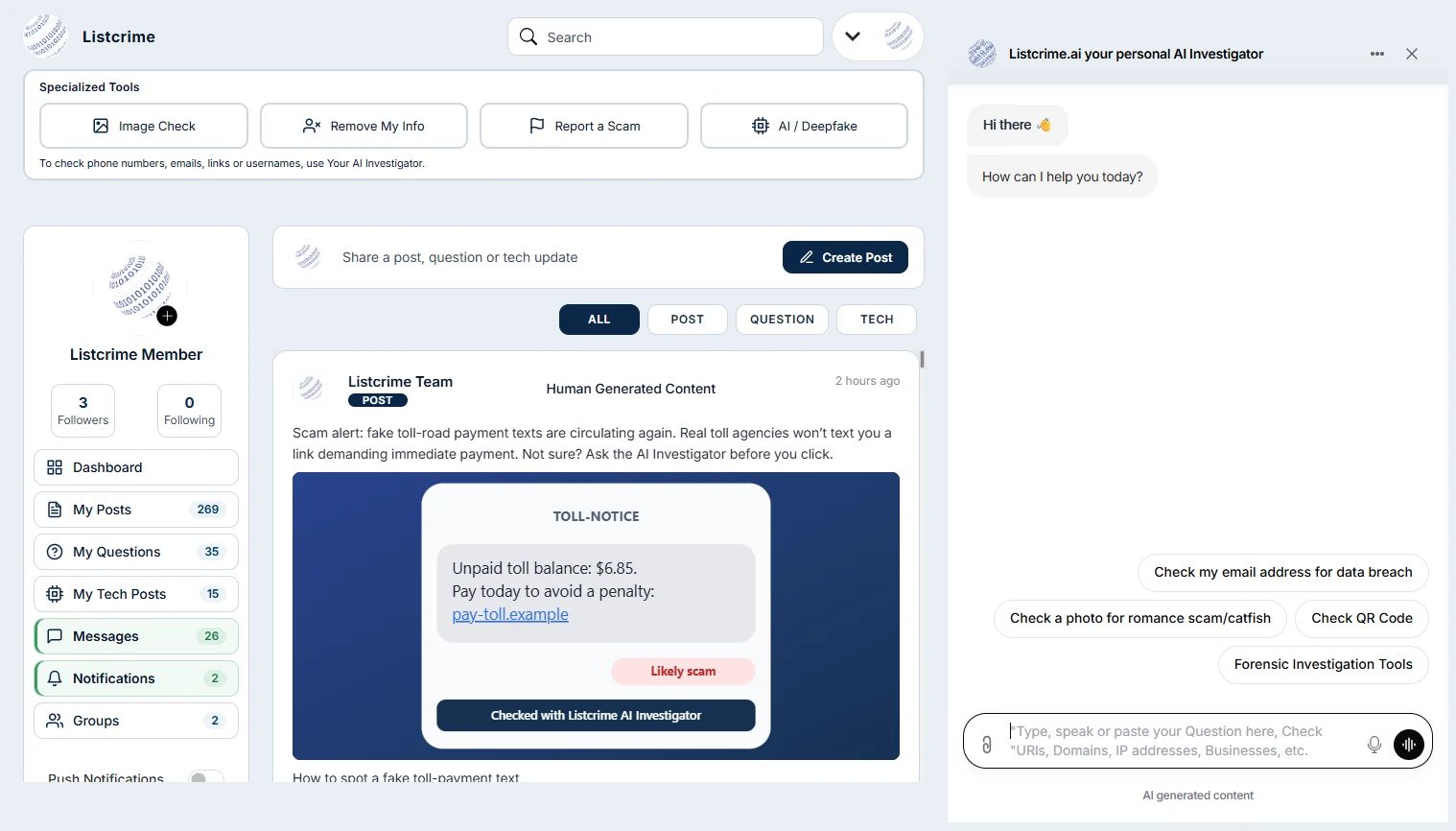
The AI Investigator is your personal scam-checking assistant, open right beside the feed. Type, speak or paste a question, link, domain, IP address or business name, or attach a file, and it analyzes the details using real-time threat intelligence. One-click shortcuts check an email address for data breaches, a photo for romance scams or a QR code, so you can decide before you click, reply or trust.
On the screenshot: marker 1, the panel on the right.
2. Community Feed
The Community Feed is where members share what they are seeing right now: scam warnings, questions about suspicious messages and practical tech tips. Every item is labeled as a post, question or tech update, and the All, Post, Question and Tech filters help you focus. Like, comment and share to help others, and learn from law enforcement, subject-matter experts and everyday users working together.
On the screenshot: marker 2, the center column.
3. Specialized Tools
Specialized Tools sit across the top of every page, so help is always one click away. Image Check helps you examine a suspicious photo, Remove My Info helps you take steps to protect your personal information, Report a Scam lets you document what happened, and AI / Deepfake helps you spot manipulated content. To check phone numbers, emails, links or usernames, switch to the AI Investigator.
On the screenshot: marker 3, the toolbar across the top.
4. Messages
Messages give you a private space to talk directly with other members, away from the public feed. Follow up with someone who shared a warning, compare notes about a suspicious caller or seller, or coordinate with people you trust before posting publicly. Your conversations are always one click away in the left-hand menu, so it is easy to pick up where you left off.
On the screenshot: marker 4, in the left-hand menu.
5. Notifications
Notifications keep you up to date on activity involving you and your posts, so you never miss a reply to a question you asked or a response to a warning you shared. Everything is collected in one place in the left-hand menu, and you can switch on push notifications to be alerted as things happen, even when Listcrime is not open in front of you.
On the screenshot: marker 5, in the left-hand menu.
6. Groups
Groups bring members together around a shared topic, community or ongoing investigation. Create your own group or take part in groups you belong to, then share posts and questions with the people who need them most. Each group has its own members and its own feed, which keeps focused conversations organized and makes it easier to coordinate with family, colleagues or a neighborhood watch.
On the screenshot: marker 6, in the left-hand menu.
7. Posts and Questions
Sharing starts in the compose box at the top of the feed. Choose whether you are posting a scam warning, asking the community a question or publishing a tech update, then add text, images, video or a link. Clear labels help the right people find your post, and comments let members add context, confirm what they have seen and help each other stay one step ahead of scammers.
On the screenshot: marker 7, the compose box above the feed.
8. Digital Forensics
Digital Forensics lets you go deeper than a quick check when something does not add up. Analyze images for signs of manipulation or deepfakes, examine suspicious emails and files, including .EML, .HAR, JSON and CSV, and check QR codes before you scan them. Use these tools with the AI Investigator’s Forensic Investigation Tools option to build a clearer picture before you decide what to do next.
On the screenshot: marker 8, starting with Image Check.